
Description
FEELWORLD Living Stream LIVEPRO L1 Multi-Format video mixer HDMI Video Switcher for live broadcast system virtual studio


Display Spec.
| Model | LIVEPRO L1 |
| Screen Size | 2.0″ TFT Display |
| Backlight | LED |
Input
| 4 X HDMI | HDMI |
Output
| 1 X HDMI | HDMI |
| 1×USB TypeA | USB 3.0 |
Audio
| Audio In | 1×3.5mm Stereo Jack |
| Audio Out | 1×3.5mm Stereo Jack |
Input Solution
| HDMI |
| SMPTE 720p@50/60 |1080i@50 | 1080p@23/24/30/50/60) |
| VESA 1024×768@60 | 1280×720@60|1280×768@60 |1280×800@60 | 1280×1024@60 | 1360×768@60 | 1366×768@60| 1440×900@60| 1600×1200@60 | 1680×1050@60 |1920×1080@50i| 1920×1080@60 |1920×1080@60i|1920×1200@60 |
Output Solution
| HDMI |
| SMPTE 720p@60 |1080p@60 |
| VESA 1024×768@60 | 1280×720@60|1280×768@60 |1280×800@60 | 1280×1024@60 |1360×768@60 | 1366×768@60| 1440×900@60| 1680×1050@60 | 1920×1080@60 |
General
| Input Voltage | DC 12V / 1.5A |
| Max Power | 18W |
| Working Temperature | -30℃~50℃ |
| Humidity | 10%~85% |
| Unit Size | 185(L) x 110(W) x 39(H)mm |
| Unit Weight | 648g |
Low Cost, Multi Camera Live Production with Advanced Broadcast Features
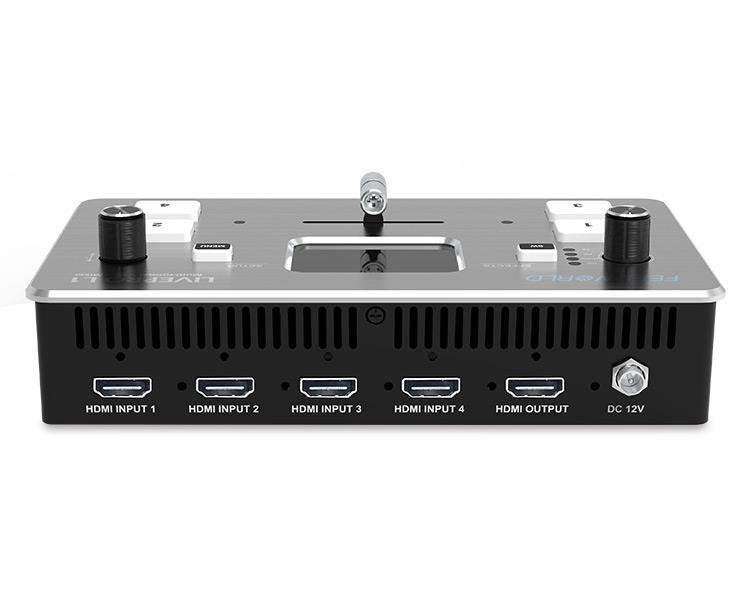
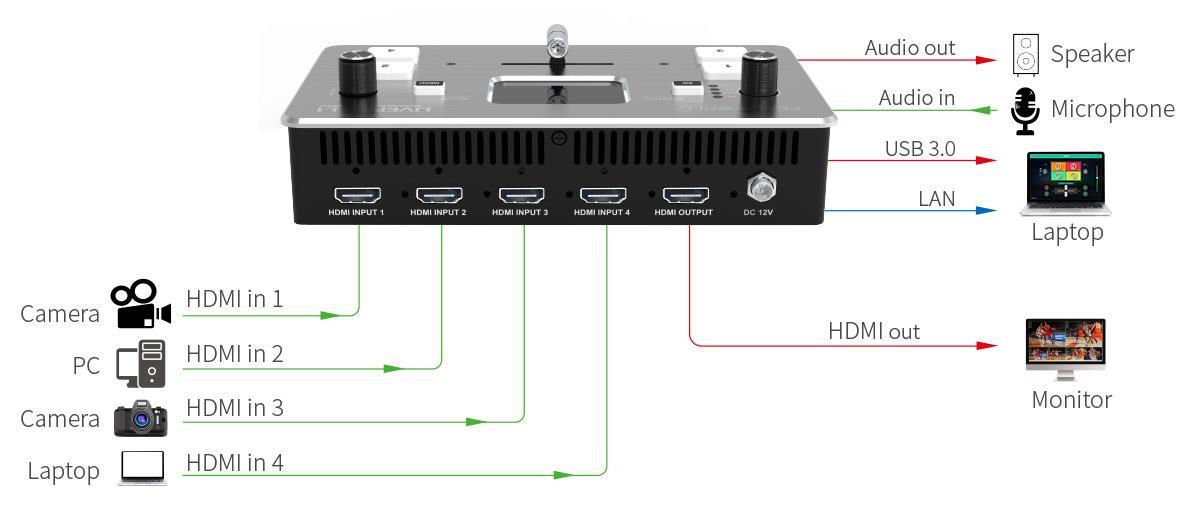
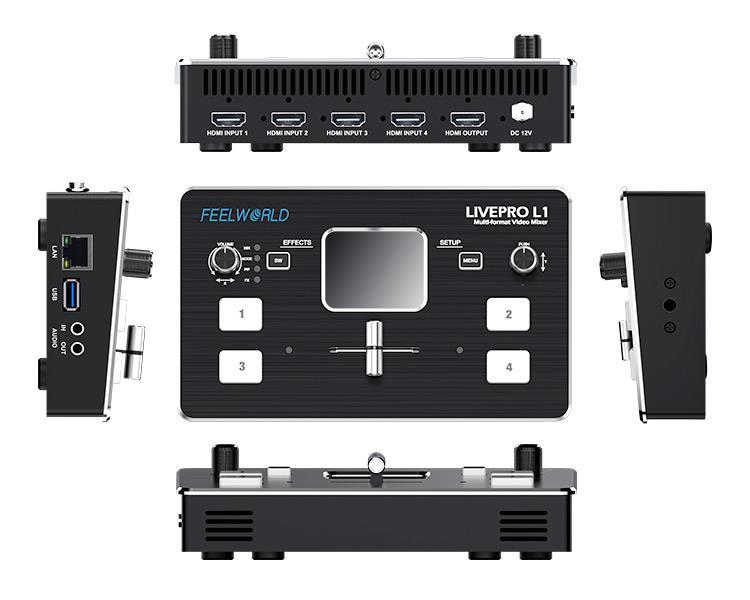
LIVEPRO L1 with 4 CH HDMI inputs and 1 HDMI output, all of them support 1080p. For live streaming, there is a USB3.0 interface . And plus, the LAN port for controlling and upgrading; for audio, it has 2 interfaces, one for input, and the other one for output. All of these make it easy to create professional multi camera productions . It is able stream any one from the 4 HDMI inputs to any live broadcasting platform via third party live streaming software such as OBS . Simply connect LIVEPRO L1 and you can switch live between 4 high quality video camera inputs for dramatically better quality images. Or connect a computer for PowerPoint slides or gaming consoles.
LIVEPRO L1 with 4 CH HDMI inputs and 1 HDMI output, all of them support 1080p. For live streaming, there is a USB3.0 interface . And plus, the LAN port for controlling and upgrading; for audio, it has 2 interfaces, one for input, and the other one for output. All of these make it easy to create professional multi camera productions . It is able stream any one from the 4 HDMI inputs to any live broadcasting platform via third party live streaming software such as OBS . Simply connect LIVEPRO L1 and you can switch live between 4 high quality video camera inputs for dramatically better quality images. Or connect a computer for PowerPoint slides or gaming consoles.

Exquisite and Flexible Control Panel
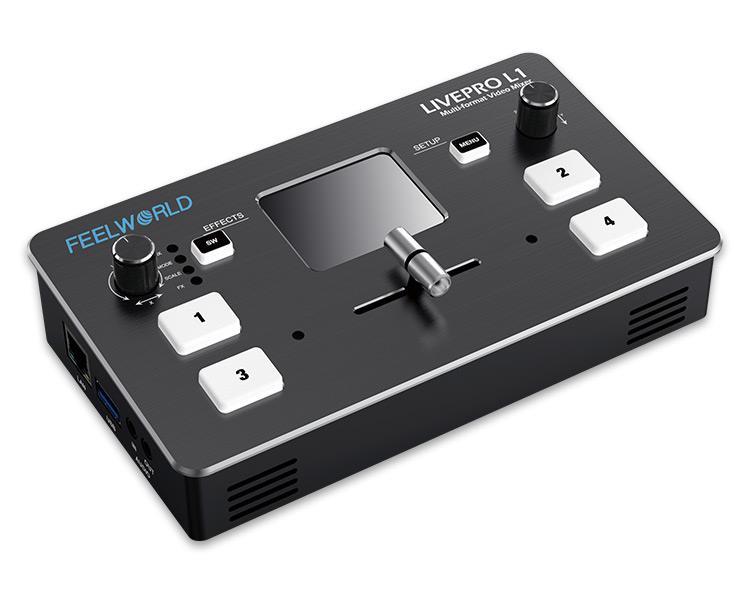
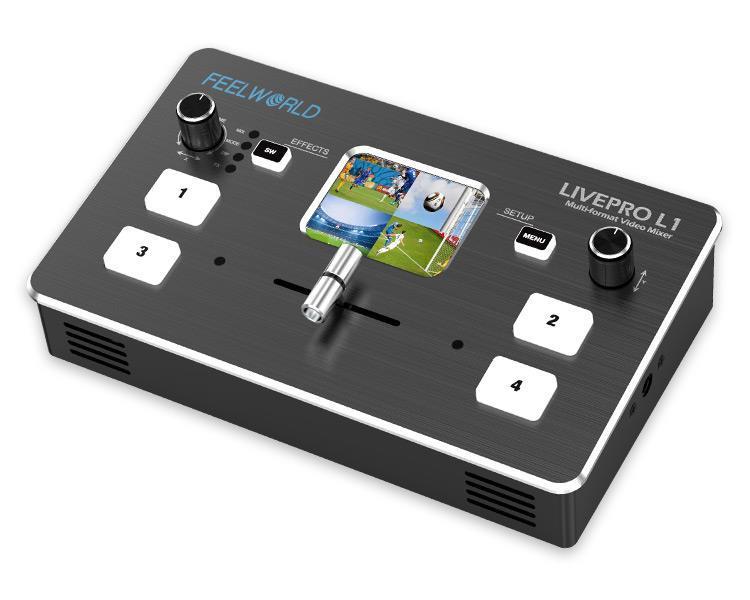
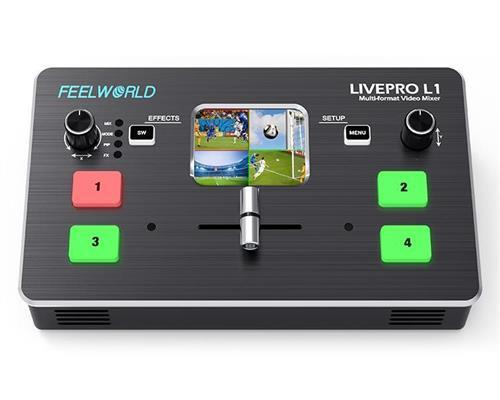
The LIVEPRO L1 has an exquisite and compact control panel. The 4 buttons are for selecting input signals, green flashing means the signal has been selected, then switch the T-Bar, the selected signal will be displayed on the screen seamlessly, and the green button changed to red after switched. The Menu button is for menu setting, the SW button is for selecting different functions such as mixing, scaling, transition time setting, and the other functions. The left knob is for voice volume controlling, the right knob is for menu setting as well. From the TFT screen, we can preview 4 HDMI signals and easily do menu settings.
The LIVEPRO L1 has an exquisite and compact control panel. The 4 buttons are for selecting input signals, green flashing means the signal has been selected, then switch the T-Bar, the selected signal will be displayed on the screen seamlessly, and the green button changed to red after switched. The Menu button is for menu setting, the SW button is for selecting different functions such as mixing, scaling, transition time setting, and the other functions. The left knob is for voice volume controlling, the right knob is for menu setting as well. From the TFT screen, we can preview 4 HDMI signals and easily do menu settings.

Compact and Lightweight Design
The LIVEPRO L1 is a mini switcher, that is small enough to fit into equipment cases and camera bags. Designed to integrate with typical video production workflows, the LIVEPRO L1 has a screw tap for standard video mounts and is conveniently attached to a tripod to stay out of the way. It is lightweight design makes it ideal for mobile video applications too.
The LIVEPRO L1 is a mini switcher, that is small enough to fit into equipment cases and camera bags. Designed to integrate with typical video production workflows, the LIVEPRO L1 has a screw tap for standard video mounts and is conveniently attached to a tripod to stay out of the way. It is lightweight design makes it ideal for mobile video applications too.

Multi-Application, One Solution
Normal people, need smaller and simpler products to deal with live applications. The LIVEPRO L1 can be done this, which is with a simple and compact design, rich special effects switching function, and the screw hole can be fixed by the switcher on the tripod. With these, live-streaming and multi-signal control will be simpler and easier done by a single person.
Normal people, need smaller and simpler products to deal with live applications. The LIVEPRO L1 can be done this, which is with a simple and compact design, rich special effects switching function, and the screw hole can be fixed by the switcher on the tripod. With these, live-streaming and multi-signal control will be simpler and easier done by a single person.

Faster Video Production, Plus Live Streaming
Live production is the fastest way to complete a finished program, plus you can stream it to a live global audience via YouTube at the same time. The USB 3.0 output of LIVEPRO L1 connects to any computer and looks like a built-in webcam, so all streaming software for social media platforms works! With up to 4 HDMI inputs, you can set up multiple camera angles, such as wide shots along with independent close-ups of each person in the performance. Or you can connect to a computer with a PowerPoint slide show, video clip playback, websites, or gaming consoles. All switching is in real-time, so you can live stream to any social media platform such as YouTube, Facebook, TikTok, Douyu TV, and many more!
Live production is the fastest way to complete a finished program, plus you can stream it to a live global audience via YouTube at the same time. The USB 3.0 output of LIVEPRO L1 connects to any computer and looks like a built-in webcam, so all streaming software for social media platforms works! With up to 4 HDMI inputs, you can set up multiple camera angles, such as wide shots along with independent close-ups of each person in the performance. Or you can connect to a computer with a PowerPoint slide show, video clip playback, websites, or gaming consoles. All switching is in real-time, so you can live stream to any social media platform such as YouTube, Facebook, TikTok, Douyu TV, and many more!

Flexible T-Bar Switching
The T-Bar of LIVEPRO L1 supports 14 transition effects and signal switching. Under T-Bar mode, pushing the green button, will flash and push T-Bar to the end (left or right), and the source will be switched with the selected transition effect. After switching, green turns to red. It is very suitable for video special effects switching of small outdoor scenes to meet the needs of video switching such as radio and television, outdoor sports events, school courseware production, etc.
Note: When T-Bar is not in the end position, no source can be selected.
The T-Bar of LIVEPRO L1 supports 14 transition effects and signal switching. Under T-Bar mode, pushing the green button, will flash and push T-Bar to the end (left or right), and the source will be switched with the selected transition effect. After switching, green turns to red. It is very suitable for video special effects switching of small outdoor scenes to meet the needs of video switching such as radio and television, outdoor sports events, school courseware production, etc.
Note: When T-Bar is not in the end position, no source can be selected.

To Embed or De-embed? Why not Both?
The LIVEPRO L1 not only lets you embed analog audio into an HDMI signal for recording or live-streaming, but you can also extract the audio from an HDMI signal to send over to a larger dedicated audio mixer. Where many converters only support digital audio or offer either embedding or de-embedding (and not both), the LIVEPRO L1 lets you do it all. For output audio, select HDMI embedded audio or external audio. When embedded audio is selected, PGM picture sound will be output from HDMI out, and PST picture sound from audio out; when external audio is selected, external audio sound will be output.
The LIVEPRO L1 not only lets you embed analog audio into an HDMI signal for recording or live-streaming, but you can also extract the audio from an HDMI signal to send over to a larger dedicated audio mixer. Where many converters only support digital audio or offer either embedding or de-embedding (and not both), the LIVEPRO L1 lets you do it all. For output audio, select HDMI embedded audio or external audio. When embedded audio is selected, PGM picture sound will be output from HDMI out, and PST picture sound from audio out; when external audio is selected, external audio sound will be output.

6 Picture PVW, PIP
When the switcher is connected to an external expansion screen, it can preview real-time monitoring on 6 pictures, including PGM, PST, and 4-channel HDMI input signals, and the audio column is displayed. Plus, you can set 9 layouts for PIP (Picture in Picture) mode. This is very useful for large-scale multi-stand field production.
When the switcher is connected to an external expansion screen, it can preview real-time monitoring on 6 pictures, including PGM, PST, and 4-channel HDMI input signals, and the audio column is displayed. Plus, you can set 9 layouts for PIP (Picture in Picture) mode. This is very useful for large-scale multi-stand field production.

USB 3.0 Live Streaming
Make Live Broadcasting More Convenient and Fast
To ensure maximum compatibility, LIVEPRO L1 features a USB connection that operates as a simple webcam source. That means you can plug in and instantly get working with any video software. The software is tricked into thinking the LIVEPRO L1 is a common webcam, but it is really a live production switcher! That guarantees full compatibility with any video software and in full resolution 1080HD quality. Choose any software you like, such as OBS software for live-streaming, or conference software (Tencent conference and Yealink ) for business presentations. LIVEPRO L1 works with software and platforms such as OBS, acquisition software(AMCap, ECap, Pot player), conference software (Tencent conference and Yealink) , Youtube, Facebook, Zoom, Tik Tok and more!
To ensure maximum compatibility, LIVEPRO L1 features a USB connection that operates as a simple webcam source. That means you can plug in and instantly get working with any video software. The software is tricked into thinking the LIVEPRO L1 is a common webcam, but it is really a live production switcher! That guarantees full compatibility with any video software and in full resolution 1080HD quality. Choose any software you like, such as OBS software for live-streaming, or conference software (Tencent conference and Yealink ) for business presentations. LIVEPRO L1 works with software and platforms such as OBS, acquisition software(AMCap, ECap, Pot player), conference software (Tencent conference and Yealink) , Youtube, Facebook, Zoom, Tik Tok and more!
Note: OBS Streaming is available to download at https:/obsproject.com/download

Multiple Application Scenarios Suitable
LIVEPRO L1 is widely used in sports events, e-sports competitions, business presentations, weddings, character interviews, education, training, etc.
LIVEPRO L1 is widely used in sports events, e-sports competitions, business presentations, weddings, character interviews, education, training, etc.

Add Exciting Video Effects
One of the benefits of LIVEPRO L1 is the professional production values that are possible using the range of built-in video effects. Push button SW to open up the transition effect menu, use knob to select the desired transition effect icon, and push the knob to confirm. The “cut” in the menu ensures an instant cut when switching sources. You can also select the type of effect you want, including mix, which does a smooth transition between sources, and dip, which fades via a color during the transition. The MODE menu allows 0 .5S~ 5.0S settings. Plus, you can select PIP mode
One of the benefits of LIVEPRO L1 is the professional production values that are possible using the range of built-in video effects. Push button SW to open up the transition effect menu, use knob to select the desired transition effect icon, and push the knob to confirm. The “cut” in the menu ensures an instant cut when switching sources. You can also select the type of effect you want, including mix, which does a smooth transition between sources, and dip, which fades via a color during the transition. The MODE menu allows 0 .5S~ 5.0S settings. Plus, you can select PIP mode

PC Controlling, Remote Operation
After connecting the LAN port to the computer, no extra software needs to be installed, the software XPOSE holds on the computer, and the operation is the same as the switcher. To realize remote control, imagine using the switcher from a control room and building a professional broadcasting studio where the control room can be separated away from the performance or interviews. In addition, it allows you to add as many panels as you like all at the same time.
After connecting the LAN port to the computer, no extra software needs to be installed, the software XPOSE holds on the computer, and the operation is the same as the switcher. To realize remote control, imagine using the switcher from a control room and building a professional broadcasting studio where the control room can be separated away from the performance or interviews. In addition, it allows you to add as many panels as you like all at the same time.

TRANSLATE with ![]() x
x
English
TRANSLATE with ![]()
Enable collaborative features and customize widget: Bing Webmaster Portal








 _ USA dollar
 _ Hong Kong Dollar
Reviews
There are no reviews yet.